
Not Working
Rdma 7D
Works with
 EAC
 BattlEye
 Vanguard
 VAC
 ACE
 FiveM
$17.00
Your key appears in your dashboard after payment
Usage & Requirements
7 Days
License
Ethernet LAN
Connection
Realtek RTL8125
Main PC adapter
Windows 10/11
Platform
Tech specs
License
- Duration
- 7 days
- Type
- Software only
- No physical hardware is shipped
- Starts
- At first activation
- Not at purchase
- At expiry
- The license stops
Connection
- Link
- Ethernet (local network)
- Wi-Fi
- Not supported
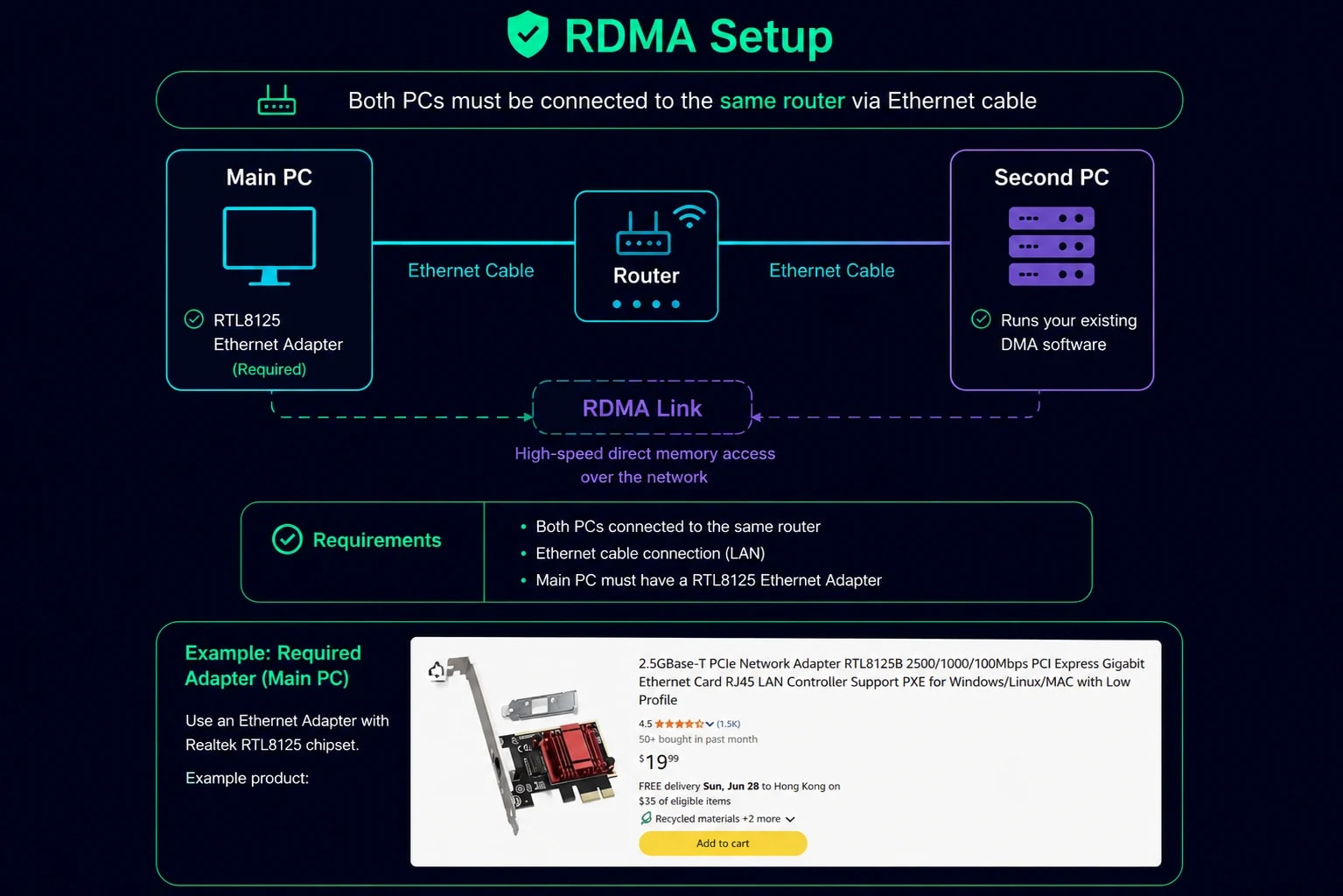
- Both PCs must be connected to the network with an Ethernet cable
- Topology
- Switch, router or modem
- Both PCs on the same local network
- Direct PC-to-PC cable
- Not required
- The two machines never connect to each other directly
Network adapter
- Main PC
- Realtek RTL8125 / RTL8125B / RTL8125BG
- Required. Built into the motherboard or as a PCIe network card
- Second PC
- Any Ethernet port
Systems
- Main PC
- Windows 10 / 11
- Second PC
- Windows 10 / 11
How it works
- 1.
The Main PC (the one running the game) and the Second PC (the one running the reading software) must be connected to the same local network via Ethernet cable, whether through a switch, router, or modem.
- 2.
On the Main PC, a module/driver is executed that exposes a portion of physical memory (the game's memory) to the local network.
- 3.
The Second PC connects to the Main PC through its local IP address and establishes a communication channel.
- 4.
Through this channel, the Second PC directly reads the Main PC's memory data (player positions, game states, etc.) without the game or anti-cheat on the Main PC detecting a suspicious process running locally.
- 5.
The data is processed on the Second PC and displayed separately (external radar, overlay on a second monitor, etc.).
What you need
- Main PC
Windows 10/11, connected to the LAN (switch, router, or modem)
- RTL8125 Ethernet adapterImportant
Required on the Main PC: Realtek RTL8125, RTL8125B or RTL8125BG. Many motherboards have one built in; if yours doesn't, add a PCIe network card with one of these chipsets.
- Second PC
Windows 10/11, connected to the same LAN as the Main PC
- Ethernet Cables
One cable per PC to the switch/router/modem. No direct connection between the two PCs is required.
- No Wi-FiImportant
Both PCs must be wired to the network with an Ethernet cable. Wi-Fi is not an option.
RDMA or a DMA Card?
- No DMA card or fuser
RDMA runs over your local network through the Main PC's network adapter. If your motherboard already has a Realtek RTL8125 port there is nothing to buy; otherwise a low-cost RTL8125 PCIe card is all you need.
- Nothing to flash
There is no firmware, no JTAG and no donor data. The setup is software from end to end.
- Both PCs must be on the same LANImportant
This is the one hard requirement. If you cannot cable both machines to the same switch, router or modem, a DMA card is the better route.
- Time-limited license
This is a 7 day license, not a physical product you keep. For a longer run, look at the 30 day version.
Questions? Answers.
Do I need a DMA card for this?
No. RDMA works over your local network, so there is no DMA card or fuser. The Main PC does need a Realtek RTL8125, RTL8125B or RTL8125BG Ethernet adapter: many motherboards have one built in, otherwise you can add a low-cost PCIe network card with one of these chipsets.
How do I check if my Main PC has an RTL8125?
Open Device Manager and expand Network adapters. An RTL8125 usually shows up as "Realtek Gaming 2.5GbE Family Controller" or "Realtek PCIe 2.5GbE Family Controller". You can also check the LAN chipset in your motherboard's specifications.
Do the two PCs need to be connected to each other directly?
No. Each PC just needs its own Ethernet cable to the same switch, router or modem. They find each other over the local network by IP address.
How long does this license last?
7 days. If you want a longer period, the 30 day version covers the same product for a full month.
When does the license start?
At first activation, not at purchase. The 7 days count from the moment you activate it, and when they run out the license simply stops.
Can I use Wi-Fi?
No. Both PCs must be connected to the network with an Ethernet cable.